
What this template is for
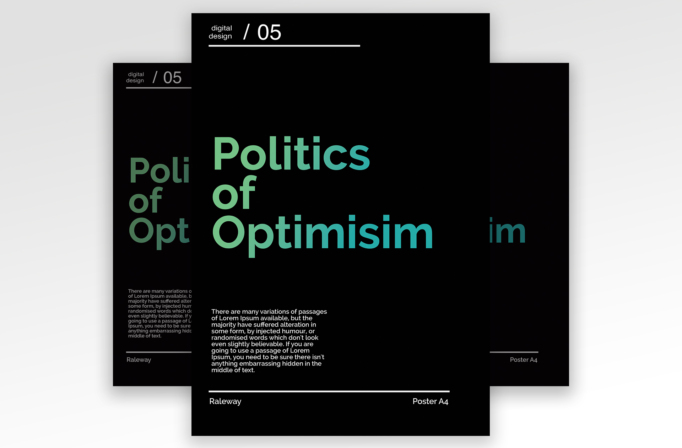
Free Brochure and Book Cover Photoshop Template 107 actually shows a stark editorial poster built around the phrase “Politics of Optimism.” The nearly all-black page, oversized typography, and restrained aqua-to-green color make it feel more like a cultural lecture, design conference, manifesto poster, or contemporary exhibition announcement than a brochure or book cover. It is especially effective when the title itself is the campaign’s main visual idea.
Design details
- A solid black background creates dramatic contrast and gives the design a serious, modern atmosphere.
- The central headline is set in a very large geometric sans serif. Its green-to-cyan gradient introduces energy without weakening the minimal palette.
- The title is deliberately fragmented across multiple lines, with cropped letter groups extending toward the edges. This experimental composition feels intellectual and editorial.
- A small “digital design / 05” label and fine white rule sit at the upper left, functioning like an issue number, program marker, or event series identifier.
- A compact explanatory paragraph anchors the lower left, while a long horizontal rule and small footer labels balance the bottom edge.
How to use it
- Download the ZIP and open the Photoshop source file.
- Replace the headline with a short phrase of two to five words. Adjust line breaks manually so the enlarged type remains expressive rather than accidental.
- Change the small series label, issue number, description, and footer text to match your event or campaign.
- Keep the background dark and choose one controlled gradient or accent color for the title. Check every cropped letter at the artboard edge before exporting.
- Save a high-resolution print version for posters and a reduced RGB version for digital announcements.
Download
Download free-brochure-and-book-cover-photoshop-template-8.zip“>Download Flyer-Design-Template-107.zip
Related templates
Find more typography-led layouts in the best flyer templates roundup, or browse the business flyer hub for promotional alternatives.
FAQ
Can I edit this flyer in Photoshop?
Yes. The typography, gradient, small labels, paragraph, rules, and background can all be customized in Photoshop.
What should I change first?
Begin with the oversized headline and its line breaks, then update the series label, number, paragraph, and footer text.
Can I use it for print and social media?
Yes. It can become a printed poster for a public talk, symposium, or exhibition and a cropped digital announcement for social channels.







