
What this template is for
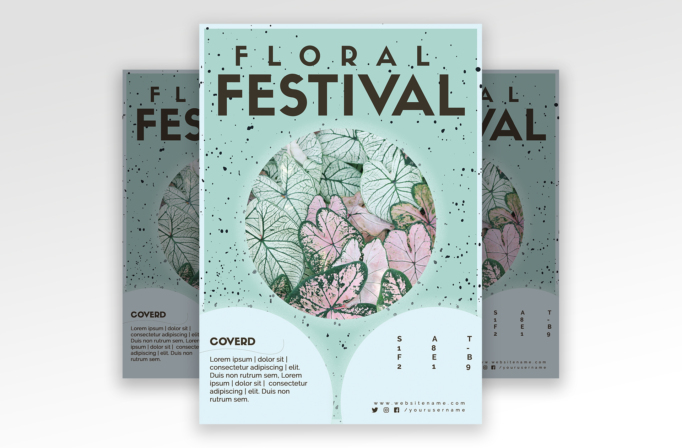
Free Brochure and Book Cover Photoshop Template 106 actually presents a fresh botanical event flyer rather than a brochure or book cover. Its centered “Floral Festival” headline, circular foliage photograph, and compact date and contact areas make it best suited to a flower show, plant market, garden club event, or similarly nature-led promotion. The pale mint palette feels calm and contemporary, while the black ink speckles keep the page from looking overly delicate.
Design details
- A soft mint-green background is framed by a narrow icy-blue border, producing a light, clean finish that suits spring and botanical themes.
- The main title uses bold, widely spaced uppercase sans serif lettering. “Floral” sits above the much larger “Festival,” creating an immediate and orderly hierarchy.
- A large circular photo zone occupies the center of the page and is shown with white, green-veined, and blush-pink leaves. This crop is ideal for foliage, flowers, handmade goods, or an event hero image.
- Scattered black paint flecks give the otherwise polished layout a tactile, screen-printed character.
- Two oversized pale-blue circles rise from the bottom edge. The left holds a short description, while the right contains a stacked date and a small website and social row.
How to use it
- Download the ZIP file and open the PSD source in Photoshop.
- Replace the festival name while preserving the spacious uppercase treatment and strong two-line scale contrast.
- Swap the round botanical image for your own high-resolution photo, then reposition it so the most interesting details remain inside the circular mask.
- Update the short introduction, date, website, and social handle. Keep the copy concise so the curved lower panels retain their generous spacing.
- Export a print-ready version for local distribution, then create a web-sized copy for event listings or social promotion.
Download
Download free-brochure-and-book-cover-photoshop-template-7.zip“>Download Flyer-Design-Template-106.zip
Related templates
Explore the best flyer templates roundup for more event layouts, or visit the business flyer hub for adaptable promotional designs.
FAQ
Can I edit this flyer in Photoshop?
Yes. You can change the headline, body copy, date, colors, and central photograph in Photoshop.
What should I change first?
Start with the event name and central photo, then update the date, short description, website, and social handle.
Can I use it for print and social media?
Yes. Export a high-resolution copy for a floral festival, botanical workshop, or garden market, then resize a second copy for social promotion.







