
What this template is for
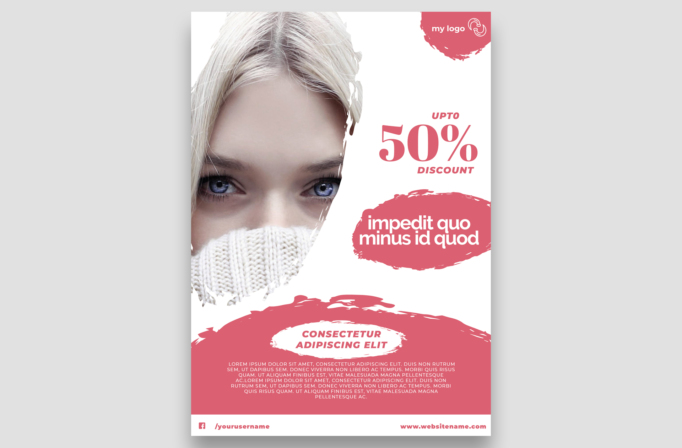
Free Brochure and Book Cover Photoshop Template 93 is actually a fashion discount flyer built around a close-up winter portrait and a prominent “50%” offer. The coral-pink and white palette feels youthful, bright, and beauty-oriented, while rough brush shapes keep the composition energetic. It is a natural fit for a women’s fashion sale, cosmetics promotion, or cold-weather accessories campaign.
Design details
- A tightly cropped portrait fills most of the left side, focusing on the model’s eyes, pale hair, and knitted sweater for an intimate editorial effect.
- Irregular white paint masking separates the portrait from the clean offer space on the right and continues into the lower composition.
- The discount uses a large coral serif “50%,” balanced by small italic sans serif labels reading “UPTO” and “DISCOUNT.”
- A coral brush oval carries a bold white two-line headline, while another wide painted area forms the lower information panel.
- A coral logo splash occupies the top-right corner, and a simple white footer provides space for a social handle and website.
How to use it
- Download the ZIP file and open the layered file in Photoshop.
- Swap in a close portrait with strong eyes or a clear facial focal point, then adjust its scale so it fills the left photo zone.
- Replace the discount, headline, supporting paragraph, logo, social handle, and website with accurate campaign content.
- Change the coral accent to your brand color, check that all white type remains legible, and export versions for posters and online ads.
Download
Download free-brochure-and-book-cover-photoshop-template-47.zip“>Download Flyer-Design-Template-93.zip
Related templates
See additional retail layouts in the best flyer templates roundup and the business flyer hub.
FAQ
Can I edit this flyer in Photoshop?
Yes. Photoshop lets you replace the portrait, offer text, brush-panel copy, branding, colors, and footer information.
What portrait works best?
A sharp vertical close-up with the face placed left of center is ideal. Winter styling, beauty makeup, or a visible fashion accessory will reinforce the promotional theme.
Where can I use this layout?
It suits a fashion boutique discount, skincare or cosmetics offer, and a scarf or knitwear campaign. The portrait-led format also works for salon and beauty studio promotions.







