
What this template is for
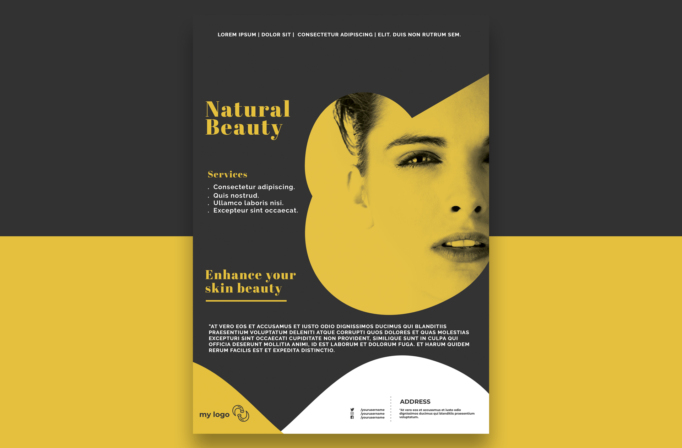
Free Brochure and Book Cover Photoshop Template 89 is shown as a bold natural beauty and skincare flyer. The close-cropped female portrait, mustard-yellow duotone effect, and charcoal background give it a modern editorial presence. It is especially suitable for a facial studio, skincare clinic, clean beauty launch, or beauty treatment campaign that needs to feel confident, artistic, and premium.
Design details
- The main palette combines dark charcoal, saturated mustard yellow, crisp white, and small black text details.
- A large female face occupies the right half and is clipped through overlapping circular forms for a memorable focal point.
- The upper-right corner introduces a sharp yellow diagonal that connects the portrait to the page edge.
- Elegant yellow serif headings contrast with compact white sans serif copy, blending beauty-editorial style with practical clarity.
- The left column separates the “Natural Beauty” identity, a short service list, and the “Enhance your skin beauty” callout.
- A broad white semicircle rises from the bottom to hold the address, social handles, and other business information beside a small logo area.
How to use it
- Download the ZIP file and open the layered design in Photoshop.
- Replace the portrait with a sharp close-up that leaves room for a dramatic crop around the eyes, nose, and mouth.
- Apply a consistent duotone or color overlay, then update the brand name, treatment list, benefit statement, and descriptive paragraph.
- Add the correct logo, address, website, and social usernames in the lower information area.
- Test the smallest text at print size and export clean versions for reception displays, direct mail, or social promotion.
Download
Download free-brochure-and-book-cover-photoshop-template-43.zip“>Download Flyer-Design-Template-89.zip
Related templates
Discover more distinctive page designs in the best flyer templates roundup, or review the business flyer hub for editable marketing options.
FAQ
What services fit the list?
Facials, skin consultations, peels, brow services, clean beauty treatments, and product recommendations all work well in the short service block.
Does the photo need a yellow tint?
The duotone treatment is central to this preview. You may choose another brand color, but keep the portrait and accent shapes within one strong hue.
Can it promote a product launch?
Yes. Replace the service bullets with product benefits and use the lower paragraph for ingredients, launch details, or a short brand story.







