
What this template is for
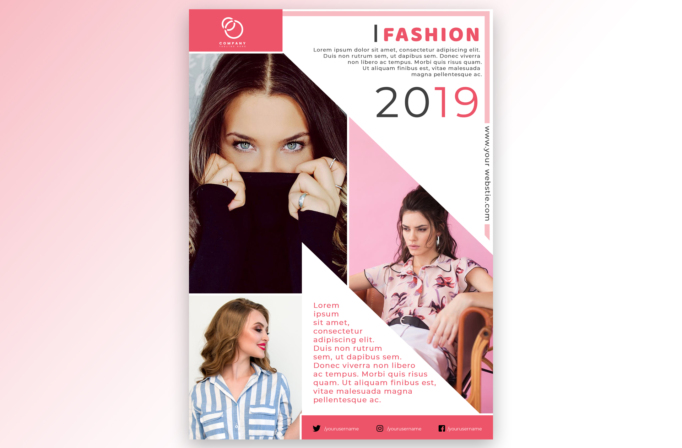
Free Brochure and Book Cover Photoshop Template 79 actually displays a portrait-format fashion editorial flyer built from three model photographs and crisp angular masks. It suits a seasonal lookbook launch, a boutique brand announcement, or a fashion event promotion. White space, coral-pink accents, and close portrait photography create a clean, feminine, magazine-inspired mood, while the asymmetrical geometry keeps the page energetic.
Design details
- A coral brand block anchors the upper-left corner, while a fine pink double-line border traces the top and right edges.
- The upper-right section contains a right-aligned “I FASHION” heading, a short introductory paragraph, and an oversized 2019 date set in thin gray and pink numerals.
- The largest portrait fills most of the left column and is cropped tightly around the model’s eyes and hands for immediate impact.
- A second portrait occupies a large pink-backed polygon on the lower right. White diagonal cutouts connect this area to a narrow central text column.
- A third, smaller fashion portrait sits in the lower-left rectangle, creating a varied collage with close-up, seated, and profile views.
- The website runs vertically along the right edge. A solid coral footer provides three compact social-media contact positions.
How to use it
- Download the ZIP file and open the PSD source in Photoshop.
- Select three coordinated fashion photographs with distinct poses. Place the most expressive close-up in the dominant left frame and keep faces clear of diagonal mask edges.
- Replace the year with a collection name, season, or campaign date. Rewrite the short upper description and central paragraph with concise launch information.
- Update the logo, vertical URL, and social usernames. Recolor the coral and pale pink shapes if required, then export versions for print, social posts, and email promotion.
Download
Download free-brochure-and-book-cover-photoshop-template-33.zip“>Download Flyer-Design-Template-79.zip
Related templates
Discover additional photo-first designs in the best flyer templates roundup, or compare campaign-ready layouts in the business flyer hub.
FAQ
What imagery works best with the angular layout?
Use portraits with uncluttered backgrounds and clear facial placement. Coordinated styling or a shared color story will make the collage feel intentional.
Can the old year be removed?
Yes. Replace it with the current year, a season such as Spring/Summer, or a short launch phrase while retaining the large numeric-style scale.
Is this suitable for beauty promotions too?
Yes. The close crops and pink editorial palette also fit cosmetics, hair styling, accessories, model portfolios, and beauty event announcements.







