
What this template is for
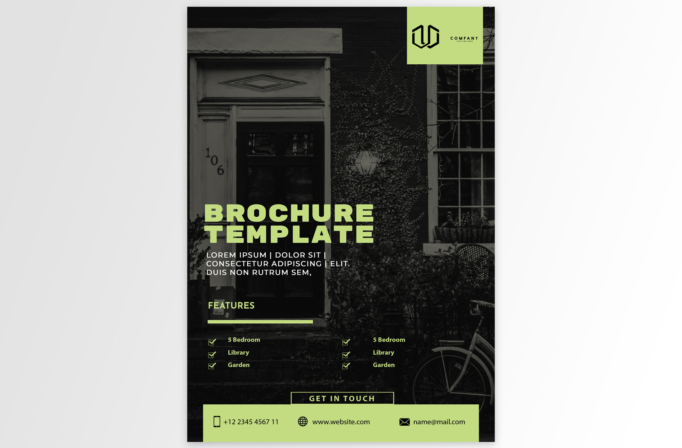
Free Brochure and Book Cover Photoshop Template 73 is presented as a dramatic real estate brochure cover with a full-page residential photograph. It fits a property listing, real estate agency handout, or open-house promotion. The prominent features checklist and contact band also make it useful for a vacation rental, boutique guesthouse, or residential development announcement.
Design details
- A dark monochrome photograph of a traditional house, garden, and bicycle fills the entire background and creates an atmospheric residential setting.
- A pale lime logo panel hangs from the upper-right edge, standing out clearly against the black facade.
- The large “BROCHURE TEMPLATE” headline appears in the same lime green near the center-left, followed by a compact white summary.
- A features section uses a lime rule and two columns of checked amenities, leaving the property image visible beneath the text.
- A bordered “GET IN TOUCH” label connects to a wide lime footer containing phone, website, and email details with simple black icons.
The black-and-lime combination is bold, urban, and slightly moody. Heavy uppercase typography gives the property message authority, while the full-bleed image lets the building’s character remain the central selling point. The limited palette keeps multiple information areas visually unified.
How to use it
- Download the ZIP file and open the PSD source in Photoshop.
- Replace the background with a high-resolution exterior property photo that has enough shadow or quiet space for readable overlay text.
- Add the agency logo, listing name, short property description, and six genuine amenities or selling points.
- Change the lime accent to a brand color that still contrasts strongly with the darkened photograph.
- Enter the agent’s phone, listing URL, and email address, then export a print-ready handout and a compressed digital version for listing campaigns.
Download
Download free-brochure-and-book-cover-photoshop-template-27.zip“>Download Flyer-Design-Template-73.zip
Related templates
Best flyer templates roundup and business flyer hub.
FAQ
Can I edit this flyer in Photoshop?
Yes. The PSD lets you replace the full-page property image, logo, headline, amenity checklist, accent color, and all contact information.
What should I change first?
Start with the property photograph and listing headline. Next, replace every placeholder feature with accurate amenities and confirm the agent contact details.
Can I use it for print and social media?
Yes. The portrait composition works as a listing sheet or open-house flyer, and the headline, photo, and contact bar can be reformatted for social ads.







