
What this template is for
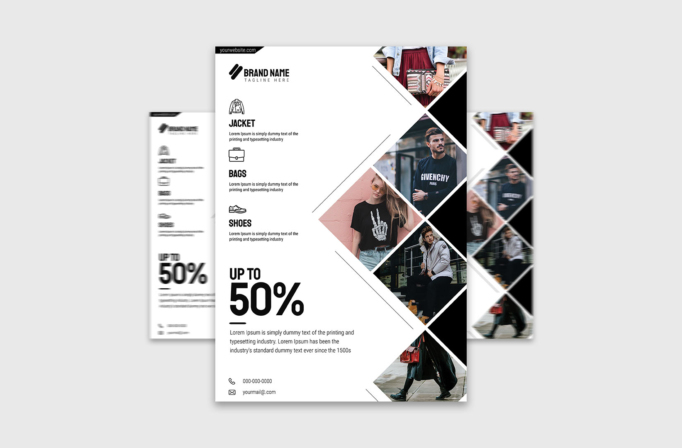
Free Brochure-Style Photoshop Flyer Template 43 is a monochrome fashion retail flyer built around a bold sale offer and a vertical collage of street-style photography. Its large white field, black typography, outlined product icons, and sharp diagonal image frames give it the feel of a contemporary lookbook page. The design can promote a clothing store sale, introduce a streetwear collection, or advertise an accessories and footwear campaign with one strong discount message.
Design details
- The left column contains the brand mark, three merchandise categories, short descriptions, and simple line icons for a jacket, bag, and shoe.
- An oversized “Up to 50%” offer fills the lower-left area, using heavy condensed type for instant impact.
- Five fashion photographs run down the right edge in rotated square and diamond crops separated by thick white borders.
- Thin diagonal rules echo the photo angles and guide the eye between product information and lifestyle imagery.
- The black-and-white palette feels editorial, modern, and easy to adapt to almost any fashion brand.
- Phone and email details sit quietly at the bottom with matching outline icons.
How to use it
- Download the ZIP file and open the Photoshop source.
- Replace the brand name, tagline, website, category labels, discount, descriptions, phone number, and email address.
- Swap the right-side images for a coordinated set from one campaign, preserving the diagonal crops and clear subject placement.
- Change the product icons if your offer focuses on categories such as dresses, watches, eyewear, or children’s clothing.
- Export the finished artwork for in-store posters, seasonal sale handouts, or vertical social posts.
Download
Download free-brochurestyle-photoshop-flyer-template-18.zip“>Download Flyer-Design-Template-43.zip
Related templates
Browse the best flyer templates roundup for more retail-friendly layouts, or explore the business flyer hub for broader campaign options.
FAQ
Do all five photos need to match?
They should share a consistent season, styling direction, or color treatment. A coordinated set makes the collage feel like one fashion campaign rather than unrelated stock images.
Can I add a brand color?
Yes. Apply one accent color to the logo, discount, icons, or selected borders. Keeping most of the page monochrome will preserve its editorial character.
What offer works in the large sale area?
A short percentage discount is strongest, but the space can also hold “New Collection,” “Weekend Sale,” or another compact retail message.







