
What this template is for
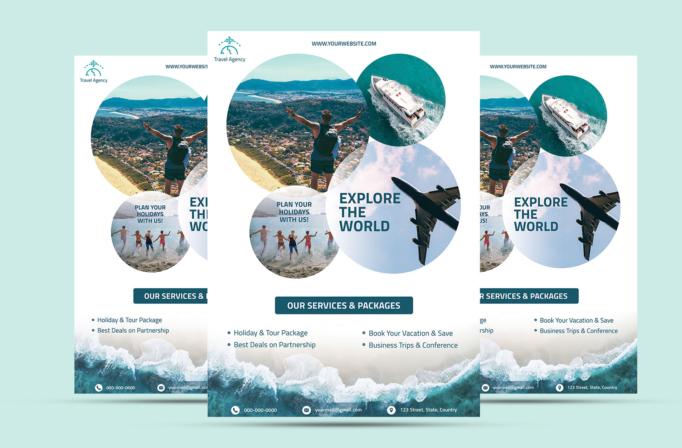
Free Brochure-Style Photoshop Flyer Template 38 is a bright travel agency flyer for promoting holidays, tours, cruises, and flight packages. Its image-led composition immediately communicates adventure: a hiker overlooks a coastal town, a yacht cuts through turquoise water, friends run into the sea, and a passenger plane crosses a pale blue sky. The mix feels aspirational and energetic without losing the practical structure needed for a service brochure. It is especially suitable for a travel agency package sheet, a summer vacation campaign, or a tour operator handout.
Design details
- Four overlapping circular photo zones create a lively collage while keeping each travel experience visually distinct.
- A white background gives the large photographs room to breathe, while deep teal headings and accents unify the page.
- The bold stacked “Explore the World” headline sits inside the airplane image and uses a strong condensed sans serif style.
- A centered teal bar introduces the services section, followed by two balanced columns for packages and trip types.
- An aerial shoreline photograph fills the lower edge, with a translucent teal contact strip carrying phone, email, and location icons.
How to use it
- Download the ZIP file and open the PSD source in Photoshop.
- Replace the travel agency logo, website, headline, and service list with your own campaign details.
- Swap the four circular photographs for destinations or activities from the same package, keeping subjects clear inside each crop.
- Update the phone number, email address, and street address, then check contrast over the beach image.
- Export a print-ready version for counters and events, plus a smaller RGB copy for email or social promotion.
Download
Download free-brochurestyle-photoshop-flyer-template-13.zip“>Download Flyer-Design-Template-38.zip
Related templates
Browse the best flyer templates roundup for more photo-driven layouts, or visit the business flyer hub for editable promotional designs.
FAQ
What campaigns fit this flyer best?
It works particularly well for multi-destination holiday packages, coastal excursions, and seasonal travel promotions where several experiences need equal visual attention.
What photos should I choose?
Use images with simple focal points and complementary blue, teal, or sandy tones. Wide destination views suit the large circles, while a clear action shot works well in the smaller lower circle.
Can I simplify the services section?
Yes. Keep only the strongest two or three offers if your campaign is focused. The generous spacing and two-column arrangement will still look balanced after short text edits.







