
What this template is for
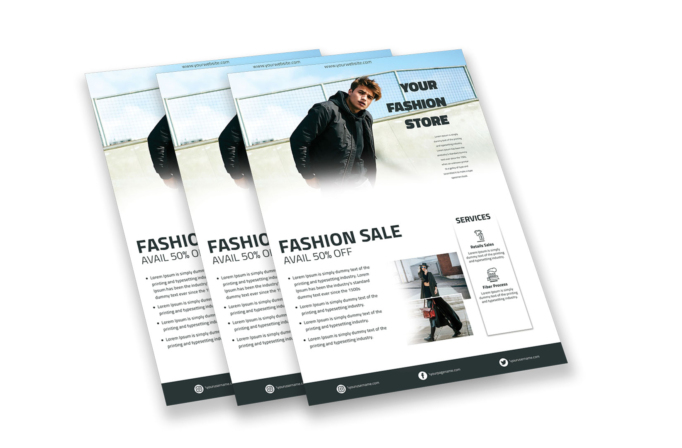
Free Brochure-Style Photoshop Flyer Template 37 is a spacious fashion-store flyer that combines a lifestyle hero image, a major sale message, supporting product photography, and a slim services panel. The design feels like a compact editorial brochure rather than a simple discount poster. Use it for a seasonal fashion sale, boutique lookbook handout, or retailer services overview.
Design details
- The upper half begins with a wide outdoor photograph of a male model, softly fading into white toward the bottom.
- A heavy black “Your Fashion Store” headline sits in the open right side of the hero image with a narrow paragraph beneath it.
- The middle section uses abundant white space and an oversized left-aligned “Fashion Sale” heading with a lighter “Avail 50% Off” line.
- A four-item bullet list supplies room for promotion details, conditions, product ranges, or store benefits.
- Two overlapping rectangular fashion photographs create a small collage near the lower center.
- A raised white sidebar titled “Services” contains line icons, bold labels, and short explanations for retail sales and fiber processing.
- A dark charcoal footer presents Instagram, Facebook, and Twitter details in evenly spaced columns.
The monochrome typography and restrained charcoal palette allow the photography to control the mood. Soft image fades, geometric alignment, and generous margins give the flyer a modern catalogue quality suitable for fashion and textile businesses.
How to use it
- Download the ZIP file and open the PSD source in Photoshop.
- Replace the hero model, two supporting images, store name, website, discount, and body copy.
- Customize the bullet list, service labels, icons, and social handles for your business.
- Check the hero fade and photo contrast after inserting new imagery, then export for print or digital distribution.
Choose photographs with compatible color grading and enough open space for nearby text. The lower photo collage works best with full-body styling images or product details that complement the main campaign shot.
Download
Download free-brochurestyle-photoshop-flyer-template-12.zip“>Download Flyer-Design-Template-37.zip
Related templates
Best flyer templates roundup and business flyer hub.
FAQ
Can I edit this flyer in Photoshop?
Yes. The photos, sale copy, service content, icons, website, and social details can all be changed in Photoshop.
What are the best use cases?
It suits boutique promotions, seasonal apparel sales, and fashion or textile companies that need to explain services alongside an offer.
Can I remove the services panel?
Yes. You can hide it and use the extra space for a larger photo collage, store locations, or more campaign details.







