
What this template is for
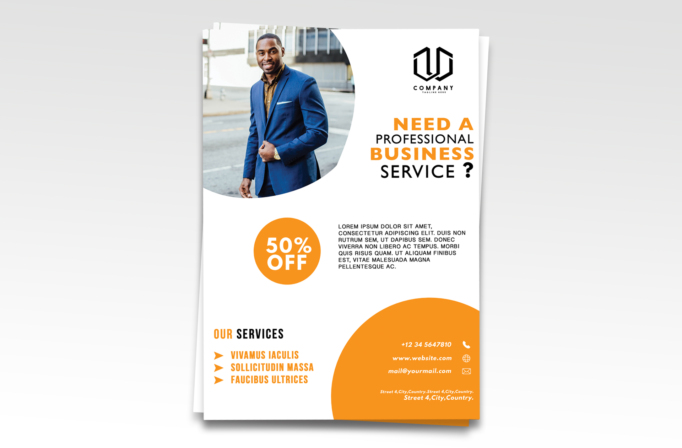
Free Brochure and Book Cover Photoshop Template 61 actually displays a professional business services flyer with a prominent portrait, discount badge, service list, and contact panel. Its straightforward sales structure makes it useful for a consultant launch, a local professional services promotion, or a coaching and advisory offer. The bright orange accent adds urgency, while the broad white background keeps the overall tone polished and easy to read.
Design details
- A large portrait of a business professional occupies the upper-left corner inside a dramatic rounded crop that curves into the white page.
- The black company logo is placed high on the right, above a stacked uppercase headline with orange emphasis on “Need a” and “Business.”
- A solid orange circle highlights a 50% off offer in oversized white type, forming the main promotional focal point.
- A compact uppercase paragraph sits beside the offer, creating a simple horizontal sales section in the middle of the page.
- The lower-left service list uses orange triangular bullets and tall condensed lettering for three short offerings.
- A large orange quarter-circle rises from the lower-right corner and contains the phone, website, email, and address in white, accompanied by simple line icons.
How to use it
- Download the ZIP file and open the template in Photoshop.
- Replace the portrait with a well-lit vertical photo of the consultant, founder, agent, or service professional. A subject positioned slightly left will work best with the curved crop.
- Update the headline to name the service clearly, then replace the short paragraph with a specific benefit and basic offer conditions.
- Edit the three service bullets to cover your most valuable offerings. This area works well for consulting packages, coaching sessions, tax or legal support, or business setup services.
- Confirm every contact detail and adjust the discount badge. If there is no discount, turn the circle into a “Free Consultation” or “Book Today” callout.
Download
Download free-brochure-and-book-cover-photoshop-template-16.zip“>Download Flyer-Design-Template-61.zip
Related templates
Browse the best flyer templates roundup for more portrait-led promotions, or visit the business flyer hub for additional service marketing layouts.
FAQ
What type of photo works best?
Use a sharp, professional portrait with uncluttered surroundings and enough background around the subject to support the large rounded mask.
Which campaigns suit this layout?
It is a natural choice for a consultant introduction, a professional services discount, or a personal brand launch with three core offers.
Can I remove the discount?
Yes. Replace the percentage with a short call to action, starting price, appointment message, or another compact statement that fits the circle.







