
What this template is for
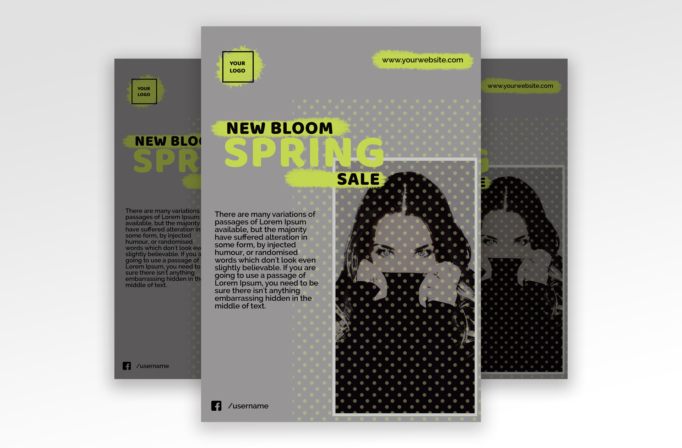
Free Brochure and Book Cover Photoshop Template 109 actually shows a fashion retail flyer announcing a “New Bloom Spring Sale.” The combination of neutral gray, fluorescent yellow-green, halftone dots, and a large monochrome portrait creates a youthful editorial look with a slightly rebellious edge. It is a natural fit for a seasonal clothing sale, beauty launch, streetwear promotion, or boutique campaign that needs to feel current and energetic.
Design details
- A medium-gray background lets the acid-lime accents and black type command attention without introducing too many colors.
- The headline is stacked in bold uppercase sans serif lettering. Rough painted strips sit behind “New Bloom” and “Sale,” giving the polished type a tactile marker effect.
- A large portrait zone occupies the lower-right half of the page inside a thin light frame. The image is treated in high-contrast black and white for a fashion-editorial mood.
- A field of lime halftone dots extends across the right side and over the portrait, tying the photo into the overall graphic system.
- The upper corners provide compact spaces for a boxed logo and website, while a short paragraph sits to the left and a social handle anchors the bottom.
How to use it
- Download the ZIP file and open the PSD source in Photoshop.
- Update the sale headline, season, store name, website, social handle, and short promotional description.
- Replace the portrait with a confident, high-resolution fashion or product image. A subject photographed against a simple background will remain readable beneath the dot pattern.
- Retain the lime accent for maximum impact, or replace it with one vivid brand color while keeping the gray and black foundation.
- Proof the body text and crop, then export separate versions for window posters, handouts, email graphics, or social announcements.
Download
Download free-brochure-and-book-cover-photoshop-template-10.zip“>Download Flyer-Design-Template-109.zip
Related templates
Browse the best flyer templates roundup for more retail-ready ideas and the business flyer hub for versatile campaign layouts.
FAQ
Can I edit this flyer in Photoshop?
Yes. You can replace the portrait and update the headline, description, logo, web address, colors, and social details.
What should I change first?
Replace the portrait and sale headline first, then update the description, logo, website, social handle, and accent color.
Can I use it for print and social media?
Yes. Use it as a printed spring sale or boutique poster, then resize the composition for a cosmetics launch or streetwear campaign online.







